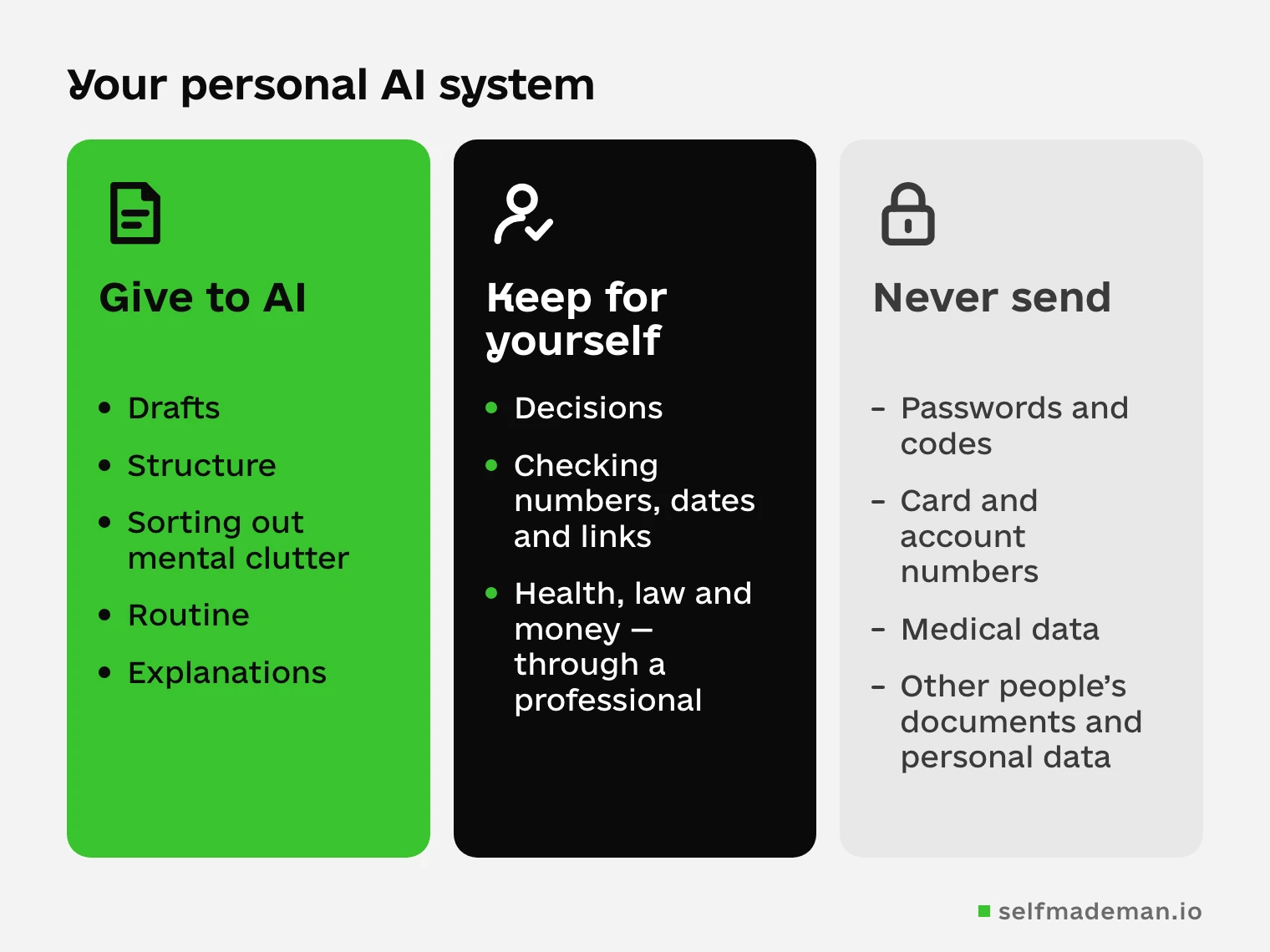
How to use AI so it actually helps every day: give it drafts, mental clutter, and routine, and keep decisions and fact-checking for yourself. ChatGPT, Claude, Gemini, and similar assistants are good at writing a first version, explaining, structuring, and suggesting ideas. They’re also confidently wrong about facts, numbers, and links. A personal AI system comes down to three things: a short list of your recurring use cases, a prompt template, and rules for what to check and what never to send. Below are all three, plus 20 use cases you can start today.
- AI is a draft and a sparring partner, not a source of truth. You check facts, numbers, and links yourself.
- It works best for writing, structuring, and routine. It’s weaker where you need precision and fresh data.
- A good prompt has a role, context, task, format, and constraints.
- Don’t send passwords, card numbers, medical data, or other people’s documents.
- Start with one use case, not twenty.
Table of contents
My experience
AI is part of my work. My gratitude list has an entry about AI tools: they let me build websites, services, and systems faster. This isn’t “the AI did everything for me.” It’s about speed.
Second, my rule about routine: any manual, repetitive work gets the question “Can this be automated?” AI is the cheapest way to get an answer. And third: anything that clutters my head goes into a system. AI turns a messy stream of thoughts into a list in a couple of minutes.
AI doesn’t think for me — it clears away what gets in the way of thinking.
I use four services myself, and each one has its own job. Claude: building websites, dashboards and databases, and wiring it all together. ChatGPT: basic questions and analyzing large documents. Perplexity and Gemini: research.
What AI does well and what it does badly
An honest picture from the research, no hype.
Writing and routine tasks: a clear gain. In an experiment published in Science, 453 professionals wrote work documents. With ChatGPT they spent 40% less time, and the quality of their writing was rated 18% higher1. The catch: the tasks were short, and nobody checked factual accuracy.
In customer support, beginners gain the most. Across 5,172 agents, an AI assistant raised the number of issues resolved per hour by 15% on average. Newer and less experienced agents got faster and did better work, while the most experienced saw a small drop in quality2.
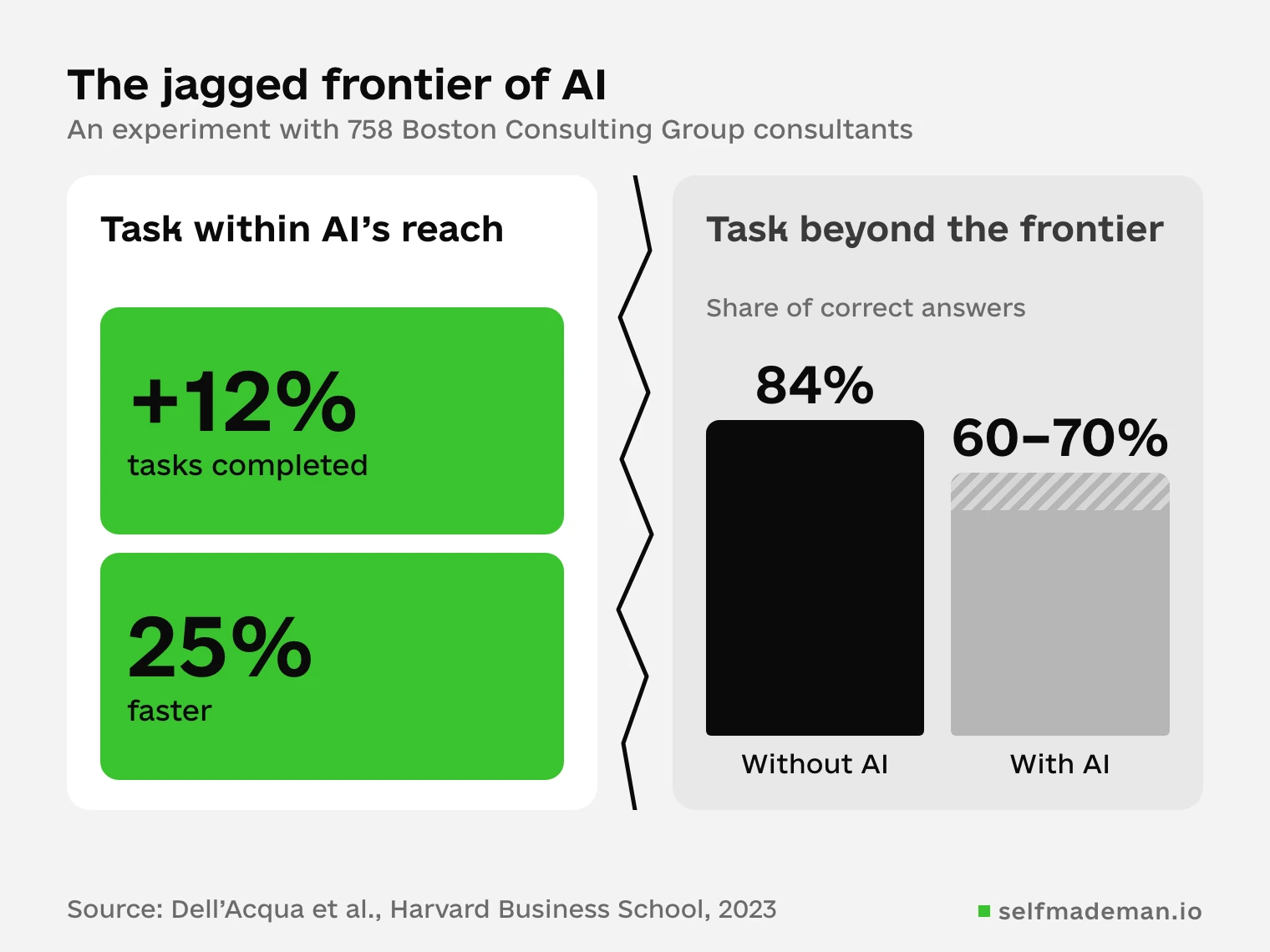
The “jagged frontier.” In an experiment with 758 Boston Consulting Group consultants, AI helped on tasks within its abilities: 12% more tasks completed, 25% faster, and noticeably higher quality. But on a task that looked similar and was actually outside its abilities, 84% of participants got the right answer without AI and 60–70% with it3.
Learning without guardrails backfires. About a thousand high school students solved math problems with GPT-4. During practice, their scores went up. But on the exam without AI, those who had used a regular chat did 17% worse than students who never had AI. The group with an AI tutor that gave hints instead of answers did about as well on the exam as the group without AI4.
Bottom line: AI speeds up what you already know how to check. Where you can’t check, it’s dangerous precisely because it sounds so sure of itself.
How to build a personal AI system: 5 steps
- Start with one assistant and get used to it. Don’t hop between five services from day one. For everyday tasks, the difference between them is smaller than it seems. Add a second one for a specific job once the first has become a habit.
- List your recurring tasks for a week. Emails, plans, notes, spreadsheets, decisions. These are your use case candidates.
- Pick 3–5 use cases from the list below. The ones that cover the tasks from step 2.
- Save your prompt templates. In your notes or in our prompt builder. You shouldn’t write a good prompt from scratch every time.
- Write down your rules for checking and privacy. What you always check, what you never send. One line per rule.
Prompt template
| Part | What to write | Example |
|---|---|---|
| Role | Who the assistant should be | “You’re an experienced editor” |
| Context | Who you are, who it’s for, what you already have | “I’m writing to a client we’ve worked with for a year” |
| Task | What to do, one verb | “Cut this email in half” |
| Format | What the answer should look like | “Three paragraphs, no corporate jargon” |
| Constraints | What not to do | “Don’t add facts that aren’t in the text” |
That last row matters more than it seems. Explicitly allow “I don’t know”: “If you’re not sure, say so. Don’t make things up.” It doesn’t guarantee there won’t be fabrications, so you still need to check.
20 ways to use AI in daily life
Planning
- Empty your head. Dump your stream of thoughts as is and ask: “Turn this into a task list, grouped by project.” Set importance and urgency yourself — for example, with the Eisenhower matrix.
- A day plan with buffers. Give it your meetings, tasks, and how much energy you have. Ask for a schedule with breaks and slack time. Check that it hasn’t planned your day as if your energy were unlimited.
- Break down a big task. “Break ‘launch a landing page’ into 25-minute steps.” Each step is one pomodoro.
- Prep for a meeting. Agenda, questions, likely objections. Five minutes instead of half an hour.
Writing and communication
- A draft from bullet points. Three points in your own words → an email, a message, a post. Reread the whole thing before you send it.
- Shorten and clarify. “Cut this in half, keep the meaning, drop the jargon.”
- Rehearse a hard conversation. Ask AI to play the other person: your boss, your landlord, a client. Rehearse your arguments before the conversation, not after.
- Translation that adapts. Not word for word, but “the way a native speaker would write it.” Show important texts to someone who knows the language.
Learning
- Explain it like I’m new — then quiz me. “Explain this, then ask me five questions. Don’t give me the answers right away.” This mode is the one that doesn’t hurt learning.
- Summarize a long text. A report, an article, a video transcript. Ask it to note which part each point comes from, and check the key passages.
- Flashcards for self-testing. Question and answer, built from your own notes. Be extra strict with flashcards AI writes from its own head.
- A 4-week study plan. What to learn, in what order, how to test yourself. Find sources yourself: AI can recommend a book that doesn’t exist.
Analysis and decisions
- Devil’s advocate. “Here’s my decision. Give me five reasons it’s a bad idea.” You still make the call.
- Sort out your spending. Bank export → categories and totals. Before you paste it in, remove account numbers, card numbers, and names.
- Compare options. Plans, products, courses. Ask for a table based on your criteria. Prices and terms come only from the seller’s website.
- Formulas and small automations. A spreadsheet formula, an email filter, a short script. Test on a copy of your data, not the working file.
Home and routine
- Meal plan and grocery list. For the week, from what’s already in your fridge. Allergies and diets are your responsibility, not the AI’s.
- Trip plan. Route, packing list, what to see. Opening hours, prices, and entry rules — only from official websites.
- A document in plain English. Instructions, a contract, a letter from your bank: “explain what each clause means.” For important decisions, this is prep for questions to a lawyer, not a replacement for one.
- Find what to automate. “Here are my recurring tasks for the week. What can be automated or turned into a template?” Then figure out what the saved time is worth — how much your time is worth will help.
AI prompt builder
Pick a scenario, adjust the five parts of the prompt and copy the result into ChatGPT, Claude, Gemini, Copilot or any other assistant. The builder only puts text together: it doesn’t send anything anywhere and doesn’t talk to AI.
- Passwords, codes, card and account numbers, ID document details.
- Medical data: your own, and even more so other people’s.
- Client and employer documents, unless company rules allow it.
- Other people’s personal data.
On personal plans, chats can be used to train models unless you turn it off, and people may read some conversations. Anonymise first, then paste. Check your assistant’s privacy settings once a quarter: they change several times a year.
Start with one scenario, not twenty. A system is three to five scenarios you run on autopilot.
Always: figures, dates and names against the original source; open links; prices, schedules and rules on the official website; recalculate calculations. Health, law and money only as questions for a specialist.
Example: the “shorten a letter” row from the prompt template in the article. Paste your own letter into the material.
Everything stays in this browser.
Risks: mistakes, privacy, fact-checking
AI is confidently wrong
A language model predicts plausible text. It doesn’t look for the truth. So it can invent a quote, a study, a section of law, or a link — and present it without a hint of doubt.
The best-known example is Mata v. Avianca in the US. Lawyers filed a brief citing court decisions generated by ChatGPT. Six of those decisions didn’t exist. In June 2023, the court fined the lawyers $5,0005.
Always check:
- Numbers, dates, names — against the original source
- Links — open them and make sure they say what’s promised
- Prices, schedules, rules — on the official website
- Calculations — redo them by hand or in a spreadsheet
- Health, law, money — only as prep for questions to a professional
What not to send to AI
- Passwords, codes, card and account numbers, ID document details.
- Medical data — yours, and even more so someone else’s.
- Client and employer documents, unless company policy allows it.
- Other people’s personal data.
Why so strict: on personal plans, chats may be used to train models unless you turn that off, and some conversations may be read by humans. In ChatGPT, you turn off training in Data Controls, and temporary chats aren’t used for training and are kept for up to 30 days6. In Claude, you choose whether to allow training on your chats. If you allow it, data is kept for up to five years; if not, 30 days7. Google explicitly asks you not to enter confidential information into Gemini: some chats are read by human reviewers, and the ones they read are kept for up to three years8.
These policies were checked in October 2026, and they change several times a year. Once a quarter, open your assistant’s privacy settings.
Where it breaks
- Twenty use cases at once. A week later, you’ll have none. A system is 3–5 use cases you do on autopilot.
- Trusting the tone. A confident answer isn’t a correct one. The less you know about the topic, the stricter the check.
- AI instead of thinking. If AI writes everything for you, you stop learning — the high school study shows it. Think with your own head first, then ask for help.
- Endless back-and-forth with the bot. Twenty revisions of one email is procrastination with a new interface. Two or three rounds, then edit it yourself.
- Other people’s data and your own. Convenience isn’t worth a leak. Anonymize first, then paste.
Minimum version
One use case a week. For example, “empty your head”: in the evening, dump everything that’s spinning in your mind and get a list for tomorrow. Five minutes a day.
If you fall off
Dropping it after a week or giving up after a bad answer is normal. Don’t restart with the whole list. Go back to the one use case that actually saved you time, and add one checking rule that covers the mistake. A system grows from repetition, not from volume.
FAQ
What is the use of AI in daily life?
Drafting texts, planning, explaining complex topics, breaking down documents, grocery lists, and comparing options. Decisions and fact-checking stay with you.
Which AI should I start with?
Any major assistant: ChatGPT, Claude, Gemini, or Copilot. For everyday tasks, the difference is smaller than it seems. What matters more is picking one and using it regularly.
Can I use AI for free?
Yes, the major assistants have free plans. The limits are usage caps and access to the newest models.
Can I trust AI answers?
As a draft, yes. As a source of facts, no. Check numbers, dates, links, and anything about health, law, or money against original sources.
Is it safe to upload documents to AI?
Only without personal or other people’s confidential data. Before uploading, remove numbers, names, and account details, and check the training settings in your service.
How do I use ChatGPT to get good answers?
Give it a role, context, task, format, and constraints. For example: “You’re an editor. This is an email to a client. Cut it in half. Three paragraphs. Don’t add facts.”
Today’s action
Open any AI assistant and do use case #1: dump everything that’s in your head right now in one message and ask for a task list grouped by project. Pick one task from the list for tomorrow. 10 minutes.
Sources
- Noy S., Zhang W. Experimental evidence on the productivity effects of generative artificial intelligence. Science, 2023, 381(6654), 187–192. ↩
- Brynjolfsson E., Li D., Raymond L. Generative AI at Work. The Quarterly Journal of Economics, 2025, 140(2), 889–942. ↩
- Dell’Acqua F., McFowland E., Mollick E. et al. Navigating the Jagged Technological Frontier: Field Experimental Evidence of the Effects of AI on Knowledge Worker Productivity and Quality. Harvard Business School Working Paper 24-013, 2023. ↩
- Bastani H., Bastani O., Sungu A. et al. Generative AI without guardrails can harm learning: Evidence from high school mathematics. PNAS, 2025, 122(26). ↩
- Mata v. Avianca, Inc., 678 F. Supp. 3d 443 (S.D.N.Y. 2023). Sanctions order of June 22, 2023. ↩
- OpenAI Help Center. Data controls in ChatGPT. Checked October 2026. ↩
- Anthropic. Updates to our consumer terms. 2025. ↩
- Google. Gemini Apps Privacy Hub. Updated May 2026. ↩